Methodist My Care Sign-Up: How to Create an Account
The Methodist My Care sign-up process allows eligible Methodist patients to create an account for the online patient portal.
A Methodist My Care account can provide access to healthcare information and services such as appointment management, communication with your care team, available test results, and prescription refill requests. Methodist My Care is available online and through the Methodist My Care mobile app.
Who Can Sign Up for Methodist My Care?
Methodist currently provides self-enrollment for eligible patients.
According to Methodist’s patient-portal information, patients who are 19 or older and have a medical record number can self-enroll. You can find your medical record number on a recent billing statement, or contact the provider’s office to obtain it.
Another option is to ask Methodist provider or clinic staff about enrollment. Patients using this method may need to provide a valid photo ID before receiving an activation email.
What Do I Need to Sign Up?
For self-enrollment, Methodist currently states that you need your medical record number and must meet the applicable age requirement.
Your medical record number may be listed on a recent billing statement. If you cannot find it, Methodist recommends contacting your provider’s office.
If you enroll through a provider or clinic, you may need valid photo identification.
First-Time Users: How to Sign Up for Methodist My Care
Self-enrollment is available for Methodist Health System patients who are age 19 or older and who don’t currently have access to Methodist My Care, which is an online portal where you can view your medical information and connect with your health care team. Complete the form below to start the self-enrollment process.
If you manage the health of a patient, talk to the patient’s health care provider during the next visit to receive a personal invitation to Methodist My Care. Self-enrollment is not currently available to caregivers or guardians.
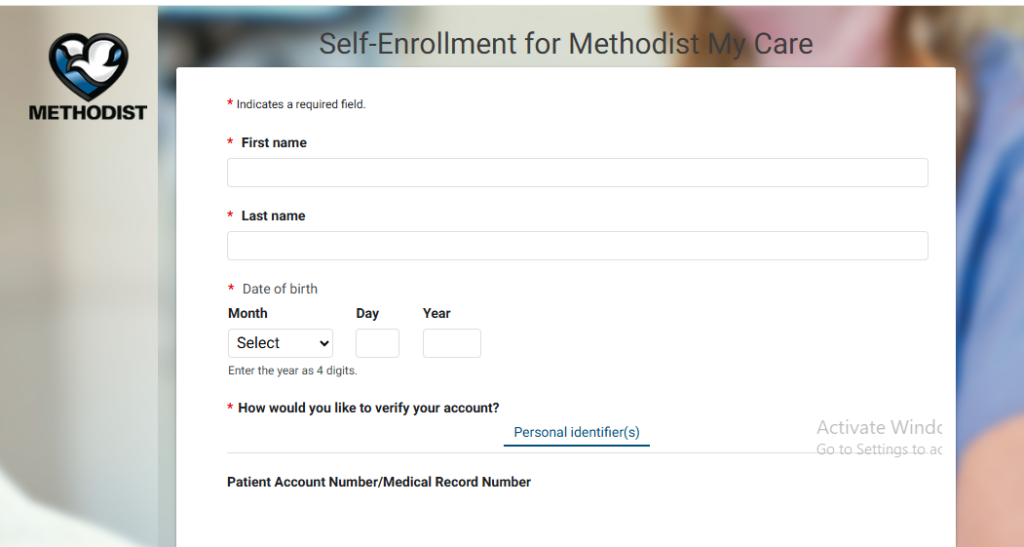
If you meet the requirements for self-enrollment, the general process is:
- Open the official Methodist My Care enrollment page.
- Select the enrollment option.
- Enter the requested identifying information.
- Provide your medical record number when requested.
- Follow the identity-verification instructions.
- Create your account credentials.
- Complete the enrollment process.
- Sign in to Methodist My Care.
The exact screens may change as Methodist updates its patient portal, so follow the instructions displayed on the official enrollment page.
Can I Sign Up Without a Medical Record Number?
The self-enrollment process described by Methodist requires a medical record number.
If you do not know yours, contact your Methodist provider’s office rather than entering a random number or using someone else’s information.
You may also ask clinic staff about enrollment during a visit.
Methodist My Care Sign Up for Children
Methodist has different enrollment arrangements for dependent children.
Its current patient-portal information states that self-enrollment is not currently available for dependent children under 19. A parent or legal guardian should discuss enrollment with the child’s provider and complete the required process in person.
Do not create an account using incorrect personal information in an attempt to bypass the enrollment requirements.
What If I Already Have a Methodist My Care Account?
You do not need to create another account simply because you want to access the portal from a different device. Use your existing login credentials through the Methodist My Care website or official app.
Creating duplicate accounts can make it more difficult to determine which account is connected to your medical information.
I Signed Up but Did Not Receive the Activation Email
If you completed enrollment through a Methodist provider and did not receive your activation email, Methodist recommends checking your email’s junk or spam folder.
Also verify that the email address provided during enrollment was correct.
If you still cannot find the message, contact your Methodist provider or the appropriate support resource.
Methodist My Care Sign Up Through the Mobile App
The Methodist My Care mobile app can be used to access the patient portal after you have an account.
Methodist’s current app also includes certain features that can be used without a portal login, such as bill pay, provider lookup, and location search. However, access to personal medical information and certain patient-portal services requires enrollment.
Is Methodist My Care Sign Up Free?
Methodist provides My Care as its online patient portal for eligible patients. There is no separate portal subscription that you need to purchase to create an eligible patient account.
Healthcare services accessed through the portal can have their own charges, depending on the service and your insurance coverage.
What If I Cannot Complete Enrollment?
Enrollment problems can happen if the information entered does not match the information held by Methodist.
Before contacting support, check:
- Your name is entered correctly.
- Your date of birth is correct.
- Your medical record number is correct.
- Your contact information is accurate.
- You are using the official Methodist enrollment page.
- Your browser is up to date.
If the problem continues, contact your Methodist provider or the appropriate patient-portal support team.
Frequently Asked Questions
How do I sign up for Methodist My Care?
Eligible patients can use Methodist’s self-enrollment process or ask their Methodist provider or clinic staff about enrollment. Self-enrollment currently requires patients to be 19 or older and have a medical record number.
Where can I find my medical record number?
Methodist says you can check a recent billing statement or contact your provider’s office to obtain your medical record number.
Can parents create Methodist My Care accounts for children?
Methodist states that self-enrollment is not currently available for dependent children under 19. Parents or legal guardians should discuss enrollment with the child’s provider.
What happens after I sign up?
After enrollment is completed, you can use your Methodist My Care credentials to access the patient portal and its available features.
Can I use Methodist My Care on my phone?
Yes. Methodist My Care is available through mobile browsers and an official smartphone app.
Final Thoughts
Creating a Methodist My Care account can make it easier to manage routine healthcare tasks online. Before starting enrollment, make sure you have the information required by Methodist, particularly your medical record number if you are using self-enrollment.
If your information cannot be verified or you do not receive an activation message, contact Methodist rather than repeatedly attempting to create another account.
Independent informational notice: This website is an independent informational resource and is not affiliated with, endorsed by, or operated by Methodist Health System or Methodist My Care.